Before you start
Select the correct organization and identify its connected HighLevel Location (sub-account). These instructions also cover the legacy LeadConnector card. Read the result on the card that owns the connection; a LeadConnector result does not become a HighLevel result.
You need access to the organization and Integrations. An account owner or admin with that access, or an authorized platform administrator, can manage removal. Other readable members can review status and should ask an organization owner or admin to resolve it.
Remove from ShowBoss permanently deletes the saved connection, HighLevel calendar mappings and workflow bindings. HighLevel app removal remains unconfirmed. You will need to restore that configuration if you reconnect.
Start removal
- Open Integrations for the selected organization.
- Find the owning HighLevel or LeadConnector card and choose Deactivate.
- Read Read Before Deactivating, type the exact displayed phrase, such as Deactivate HighLevel, and choose Deactivate.
- Read the result on that provider's card. A successful request does not by itself mean HighLevel removed the app.
While Disconnecting, ingestion is paused. ShowBoss checks status for up to two minutes. If checking pauses, HighLevel removal may still be running: choose Refresh status to read the latest result and resume observation when appropriate. A status error shows the last known result; refresh before choosing another connection action.
Do not reinstall ShowBoss directly in HighLevel while removal is pending. A later removal attempt could remove the new installation. Follow the current result and resolution guidance before reconnecting.
Read the result
| Result | Meaning and next step |
|---|---|
| Disconnecting | HighLevel removal is pending and ingestion is paused. Wait for a result or choose Refresh status if observation pauses. No resolution actions are offered while pending. |
| Access is being renewed | Removal has not started. ShowBoss says HighLevel access is being renewed. Try disconnecting again in a few minutes. Wait until the displayed retry time, then deliberately choose Deactivate again. If instructed, refresh status first. |
| Removal unconfirmed | ShowBoss could not confirm app removal. Check the installation in HighLevel and choose only a currently offered resolution action. The explanation may indicate denied access, unavailable credentials, or that confirmation could not be obtained. |
| Removal rejected | HighLevel did not allow app removal. The previous enabled or inactive state is restored. If the connection was already inactive, it remains inactive. Follow any returned recovery guidance. |
| Removal confirmed | HighLevel confirmed removal of the ShowBoss app and the ShowBoss connection was removed. |
| Removal cancelled | Removal was cancelled and the previous enabled or inactive state restored. Configuration was kept, but credentials may still need reconnecting. This does not confirm installation or healthy access. |
| Removed from ShowBoss | The connection, HighLevel calendar mappings and workflow bindings were removed locally. HighLevel app removal remains unconfirmed. Uninstall manually from the correct Location if ShowBoss is still installed. |
An ordinary disconnected card without a HighLevel removal result does not confirm provider uninstall. A legacy LeadConnector result may remain as a read-only receipt after its card disappears. Read its instructions before choosing Dismiss result; the receipt is not a current connection.
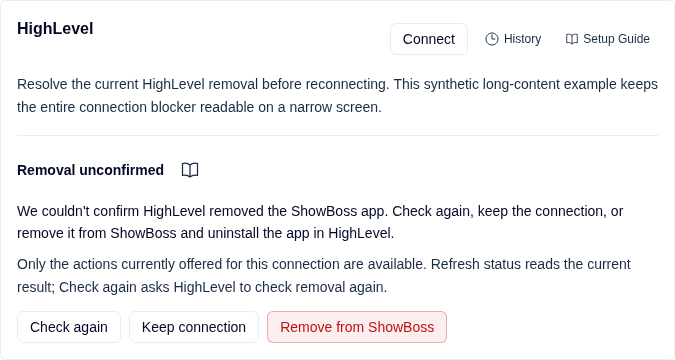
Resolve an unconfirmed result
Choose only the actions currently offered on the owning provider card. The list can change after a refresh.
- Check again asks HighLevel to check removal again. The result may return to Disconnecting or show a final outcome.
- Keep connection cancels removal and restores the previous enabled or inactive state, keeping configuration. If the card offers Reconnect or another recovery action, follow that guidance.
- Refresh status reads the latest result. It is separate from Check again and does not submit a removal or resolution action.
Remove locally
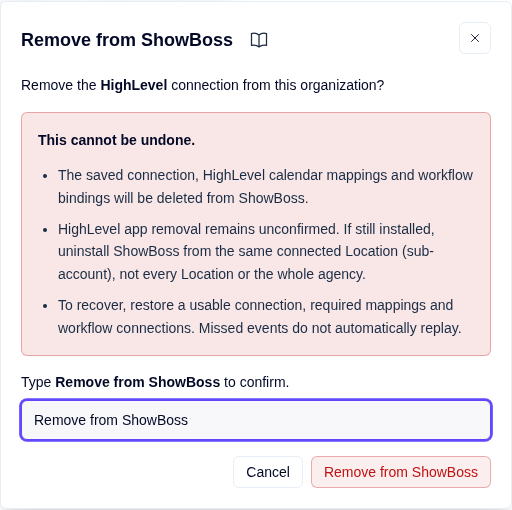
- Choose Remove from ShowBoss only if you accept permanent loss of this connection, its HighLevel calendar mappings and workflow bindings.
- Read the confirmation, including the reminder that HighLevel app removal remains unconfirmed.
- Type Remove from ShowBoss, then choose Remove from ShowBoss to submit.
- Read Removed from ShowBoss and complete the manual uninstall below if the app is still installed.
Cancel, Escape, the backdrop, or closing confirmation Help sends no removal request. A changed operation, action, permission or organization invalidates the confirmation; start again from the current result. If an error says confirmation is required, no local-removal success has been established. Refresh status and review the current actions.
Uninstall in the correct HighLevel Location
HighLevel controls depend on your permissions and the app's installation level. If you cannot see the required controls, ask your HighLevel administrator. Use HighLevel's official uninstall instructions alongside these scope checks.
- Identify the same connected Location (sub-account) used by this ShowBoss organization.
- In HighLevel, open App Marketplace → Installed Apps and find ShowBoss for that Location.
- If agency management is required, open the sub-account installations view and select only that Location before Uninstall. Do not choose every Location or agency-wide removal.
- Review the selected Location and complete the final Uninstall confirmation.
- Check that ShowBoss is absent from that Location's installed apps.
Recover missed events
Keeping a connection, rejection of removal, or reconnecting does not automatically replay events missed during removal. After local removal, restore a usable connection, required calendar mappings and workflow connections before an event can become eligible again. Reconnect alone does not restore deleted configuration.
Open the provider's History and follow the current Re-entry eligibility. Eligible failed receipts may need Re-enter within their original 30-day receipt window. Retry, keep and reconnect do not start a fresh window. Re-entry uses current eligibility and scheduling safeguards and does not guarantee delivery.
Follow Connect your first calendar to restore mappings and My first workflow did not run for re-entry limits.
Troubleshooting
Actions or Connect are unavailable
Read the card's connection blocker. Both related cards may be blocked while removal is pending. Wait for the current result, refresh stale status, or ask an organization owner or admin with Integrations access. Buttons depend on the current result and your permissions.
A request failed or timed out
A request may have reached ShowBoss even if the response did not arrive. Read the feedback and choose Refresh status when available before trying another action. Do not assume removal was cancelled, or repeatedly submit the same action.
The result changed while confirmation was open
The old confirmation closes when its operation, action, permission or scope is no longer current. Review the refreshed result and open a new confirmation only if Remove from ShowBoss is still offered.